
What your AI receptionist needs to know before it answers a single call
A go-live checklist for training an AI receptionist on your business: the decisions your website may not hold, from price ranges and service area to the never-promise list, the "I don't know" line and when a person takes over.

The short answer. Before an AI receptionist answers your phone, it needs your decisions, not just your website: what you do and don’t do, where you work, prices or price ranges, what it may book, what it must never promise, what to say when it doesn’t know, and when a person takes over. Anthropic’s guidance for its Claude models says that giving the model permission to say “I don’t know” “can drastically reduce false information”.
Who this is for. You sell through an inquiry: someone calls, and the sale depends on getting them to an estimate, an appointment or a visit. You are setting up an AI receptionist, or you have one and it says things you wouldn’t. This is the checklist to work through before it talks to a customer.
Can’t I just point my AI receptionist at my website?
It’s a reasonable start. Whether it’s enough depends on what your website leaves out, so check for the case-by-case decisions callers ask about, such as what changes a price, which jobs you turn down, what counts as an emergency, and when a person needs to pick up.
One review of an AI receptionist product makes a related point. CloudTalk’s review of Rosie, a receptionist that learns from your website and Google Business Profile, puts it plainly: “A thin website or incomplete Google Business Profile gives the agent less context to work with” (CloudTalk, Rosie AI review, 2026).
So treat the website as a first draft. The checklist below is the rest: decisions only you can make, written down once. They are the receptionist-facing part of a business brain, the one written source of truth that your staff and your AI tools both answer from.
Try it. Talk to the voice demonstration and ask it something its example business can’t answer, then listen for what it does. The business in the demo is simulated; the conversation is live.
What does an AI receptionist need to know? The checklist
Work through these ten groups in order. The first five decide what it can say; the last five decide what it does when a call goes off-script.
Why does it need an “I don’t know” rule?
Because without one, a model may guess. Researchers at OpenAI and Georgia Tech wrote in 2025 that language models “sometimes guess when uncertain” (Kalai et al., Why Language Models Hallucinate, 2025); we cover why in why your AI chatbot gives wrong answers. A guess on the phone can sound like a promise to the caller.
Anthropic’s guidance for its own models lists two techniques that map directly onto an AI receptionist. First, “Allow Claude to say ‘I don’t know’”. Second, “External knowledge restriction”: instruct the model “to only use information from provided documents and not its general knowledge”. The same page adds that these techniques “don’t eliminate them entirely” (Anthropic, Reduce hallucinations).
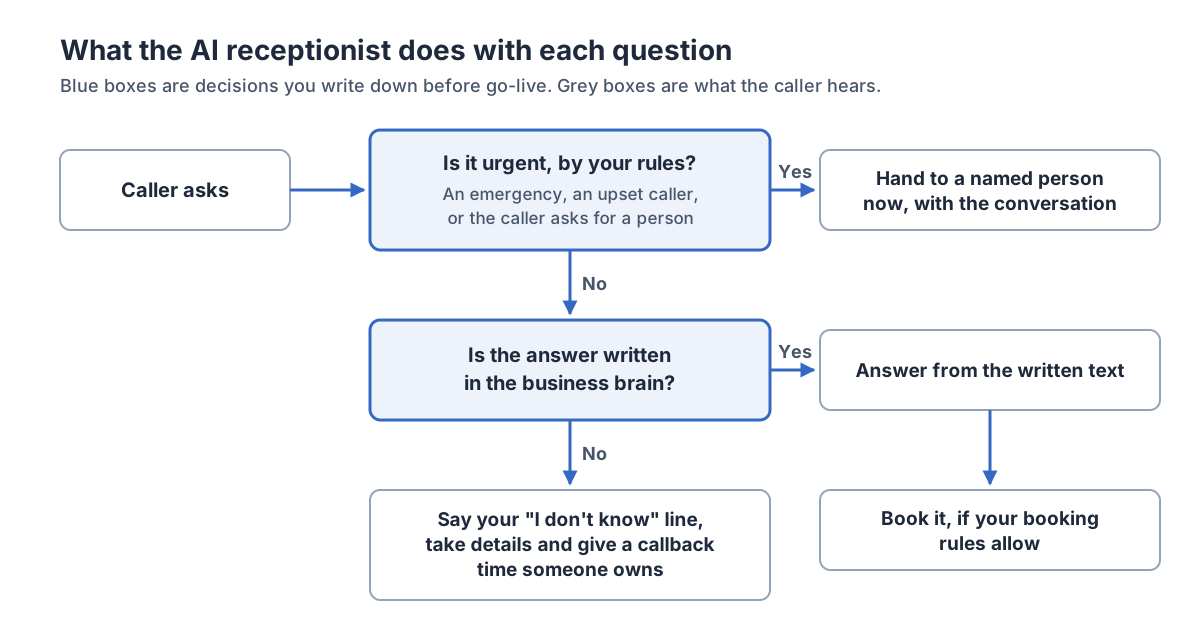
In practice, that means writing the fallback yourself. A line such as “I don’t have that information, but I can have someone call you back by 10am tomorrow. What’s the best number?” turns a gap into a callback that someone owns.
Website, FAQ list or checklist: what does each setup get you?
The more of your decisions you write down, the more the receptionist can do without guessing.
| Setup | What it can answer | What it can book | Who does the work |
|---|---|---|---|
| Website only | What’s published | Little, without rules | Callbacks land on you |
| Website plus FAQ list | Common questions | Simple appointments | You fill gaps as found |
| Full checklist above | Prices, area, exceptions | What you’ve allowed | Weekly review of calls |
The third row takes more decisions up front. What you get back is written rules for when the receptionist stops and hands over, so fewer answers are left to a guess.
How should you set up an AI receptionist, step by step?
Start narrow and widen it as the conversations show it’s ready.
- Cover the gap first. Put it on after-hours calls, or on calls you’d miss while on a job, before you give it the daytime line. For the trade-offs between AI and a live answering service on those calls, see AI receptionist vs answering service.
- Answer and take details, no booking. Load checklist groups 1–4 and 7–9. It answers what’s written down and takes details for everything else.
- Test it yourself. Call it 20 times with real questions, including awkward ones: an angry caller, a job you don’t do, a caller just outside your area.
- Read every conversation for two weeks. Add each question it missed to the document. Fix any answer you wouldn’t have given.
- Turn on booking for one appointment type. Pick the simplest, fixed-length one first.
- Widen the hours and the services once a week of conversations goes by without a correction.
Example, not a statistic. Say your last 20 inquiries break down as 7 about price, 5 about availability, 4 about service area, 2 asking “do you do X?” and 2 other. Write price ranges first, then your booking rules, then the area list: three short sections that cover 16 of the 20. Tally your own and use your order, not ours.
Numbers we left out
These figures turn up in articles on AI receptionist setup. We traced them and didn’t use them.
- “AI receptionists resolve 85–95% of calls.” NextPhone’s benchmark post gives 85–95% as its benchmark for “general questions” only, the category it calls “the easiest and the highest-volume”, from its own analysis of 1,446,980 calls across 2,074 businesses. It’s vendor data about one kind of call, and we found no independent study of AI receptionist accuracy for owner-run businesses.
- “10–15 intents cover 80% of call volume.” Smith.ai’s knowledge base guide says “you’ll likely find 10-15 distinct intents covering 80% of volume” as guidance, with no study or call sample behind it. Your own tally of 20 calls tells you more about your business.
- “64% of customers would prefer companies didn’t use AI for customer service.” It’s widely attributed to a Gartner survey. Gartner’s site blocks automated reads, so we couldn’t open the original to confirm the wording, and we left it out until we can.
Where this breaks down
- Some callers would rather talk to a person. We look at that objection in Do callers hang up on an AI receptionist? Say what it is, let anyone ask for a person, and treat hang-ups as missed calls that need a callback.
- It can still get things wrong with the right information. The “I don’t know” line and a weekly read of conversations stay in place after launch. Why that happens is covered in why your AI chatbot gives wrong answers.
- Judgment calls stay with people. Complaints, disputes, unusual jobs and price negotiations go to a person.
- The checklist ages. A price change that doesn’t reach the receptionist makes it wrong the same day. Name who updates it; agreeing that ownership is part of a Business Brain & Knowledge Base project.
How Leadio does it
Leadio’s 24/7 Answering Service is an AI receptionist, run for you as a managed service, with handoffs to the people you nominate. We configure its answers around your services, hours, area, fit questions and the situations that need your team, then test representative calls with you before it goes live. It answers calls on the agreed phone lines, uses your approved questions and connected calendar to help suitable inquiries book, and passes urgent or complex matters to the people you nominate with the context of the conversation. Our team reviews the conversations and maintains the answers.
If your business knowledge is scattered across people and documents, a Business Brain & Knowledge Base project organises it first, with your team approving the facts, so your staff and the agent tasks in scope work from one agreed version.
Try it at the voice demonstration. When you’re ready, see what the 24/7 Answering Service would look like for your business.
FAQ
How do I train an AI receptionist on my business? Give it your decisions in writing: hours, service area, services and exclusions, prices or ranges, booking rules, urgent-call rules, a never-promise list, an “I don’t know” line and handoff rules. Then test it with real questions and read its conversations before widening what it handles.
Can an AI receptionist quote prices? Yes, if you write down which prices it may quote and which jobs need someone to see them first. Ranges work when you also say what moves a job up or down.
What should an AI receptionist say when it doesn’t know the answer? A line you wrote, such as “I don’t have that information, but I can have someone call you back by 10am tomorrow.” Then it collects the caller’s details and the request goes to a named person.
Is my website enough to train an AI receptionist? It’s a start. Check whether it holds your exceptions, your urgent-call rules or what you’d never promise, because without them, a receptionist has nothing written to answer from.
Should an AI receptionist tell callers it’s AI? We think so. We cover why in Do callers hang up on an AI receptionist?
Business Brain & Knowledge Base
Organise agreed business information so staff and scoped agents can use it.
More from run on better systems.
Your AI only knows what you write down: building a business brain your staff and your AI both run on
How to train AI on your business: write down how it works once, in one place, so a new hire, an AI receptionist and your follow-up all answer from the same facts. Includes a free outline of what a business brain should contain.
Why your AI chatbot gives wrong answers, and the fixes that don't need a new AI
Why AI chatbots quote the wrong price or invent a policy: missing, outdated or conflicting information, no permission to say "I don't know", and models that add details even with the right document. A symptom-by-symptom fix list, smallest change first.
See where your leads are leaking.
Find out which stages are leaking, who we'd staff to plug them, and which Growth Team follows.