
When to ask for a Google review, and what to say
When customers say they will leave a review and then forget, remove the steps in between. Ask at the moment the job is finished, put the link in their hand within the hour, send one reminder, and stop. Scripts for in person, text and email included.

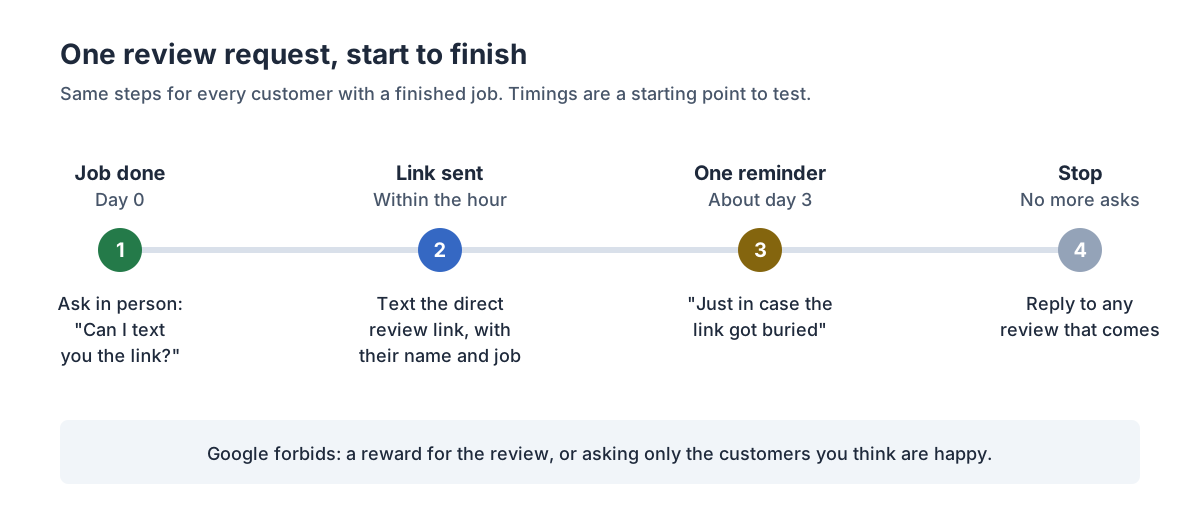
The short answer. Ask in person at the moment the job is finished, then text the direct review link within the hour, send one reminder a few days later, and stop. In BrightLocal’s Local Consumer Review Survey 2026, a vendor survey of 1,002 US adults, 78% said they had been asked to leave feedback for a business in the past 12 months. Only 28% said they would “always” write one when asked, so a yes at the door is not a promise.
Who this is for. You finish a piece of work for someone: an appointment, a repair, an install, a project. The customer is pleased, says they’ll leave a review, and you never see it. You want more reviews on Google without begging, paying for them or breaking Google’s rules.
When is the best time to ask for a Google review?
At the moment the work is visibly done and the customer has said something good about it, and then again in writing within the hour, with the link. We found no independent study that measures the best minute to ask, so this rests on owners’ reports and on one practical fact: a customer can only leave a review if they still remember to and can find where to leave it.
One owner on r/GoogleMyBusiness describes a two-step pattern: “After the customer pays and is happy ‘would you mind if I sent you a link to leave us a review on Google? It helps us out a lot’ They always say of course! I then wait 20 minutes after they left to allow them to get home, then I send the link.”
A commenter on r/smallbusiness reports the other side: “We’ve had much better results when we ask soon after the work is finished instead of waiting a week or two… Once a few days pass, life gets busy and it usually slips their mind.”
One change to the owner’s method: ask every customer at the same point in every job, not only the ones who look happy. Picking who to ask by how satisfied they seem is review gating, which Google’s policy forbids. Our article on what the FTC and Google allow covers the rules.
”They say they’ll leave a review, and they never do.” Why?
Because a “yes” at the door is not a review. Between the door and the review box, the customer has to remember, find your business on Google, find the review button and write something. Each step is a place to drop out, and none of them is about your script.
One poster on r/GoogleMyBusiness put it plainly: “Whenever I ask them for review, they say will do it. But never gets new review.” A yes is an intention. In BrightLocal’s survey, only 28% said they “always” write a review when asked.
So the fix is not a cleverer script. It is removing the steps between “yes” and the review:
- The link, not the name. “Find us on Google” adds a search. A direct link opens the review box.
- Within the hour, so that the message arrives while they are still thinking about the job, and before the next thing in their day takes over.
- One reminder. Our rule is one reminder a few days later: enough to catch someone who meant to and forgot, without turning a favour into pressure.
When should you ask, for each kind of job?
Ask at the first moment the customer can judge the result. For a short appointment that is checkout. For a long project it is the final walkthrough, not the deposit. The table gives a starting point; adjust it to how your own work ends.
| How the sale happens | Ask in person | Send the link |
|---|---|---|
| Appointment at your place | At checkout | Within the hour |
| Visit or repair at their home | At payment or walkthrough | Within the hour |
| Install or one-day job | When you show the finished work | Same evening |
| Project over weeks | At the final walkthrough | Same day, then once more |
| Recurring service | After a visit that went well for both of you | Within the hour |
| Job that had a problem you fixed | After it is fixed, same as everyone | Within the hour |
The last row matters. Customers whose problem you fixed get the same invitation as everyone else. Holding the request back from them is the kind of selective asking both the FTC and Google warn against.
How do you ask for a Google review? Five scripts
Keep each one short, name the person and the job, and put the link in every written message. None of these offers anything in return for a review, because Google’s policy forbids incentives for reviews.
In person, at the finish.
“Glad that’s sorted. Would you be up for leaving us a quick review on Google if I text you the link? It really helps people find us.”
The text, within the hour.
“Hi Sam, it’s Alex from Bellwood. Thanks again for today. Here’s the link if you have a minute to tell people how it went: [link]. Honest feedback either way helps.”
The one reminder, about three days later.
“Hi Sam, Alex from Bellwood again. No pressure, just in case the link got buried: [link]. Thanks!”
By email, for customers who prefer it.
Subject: How did we do?
Hi Sam, thanks for choosing Bellwood for the gutter repair. If you have a minute, a short review on Google helps other homeowners decide: [link]. If anything wasn’t right, reply to this email and I’ll sort it out.
For a customer whose problem you fixed.
“Thanks for your patience while we put that right. If you’re willing, I’d value an honest review of how we handled it: [link].”
Notice that the email offers a way to report a problem and the review link in the same message. That is fine. What is not fine is sending unhappy customers only to a private form and happy ones only to Google.
How to get reviews on a schedule, smallest change first
Start with the step that costs nothing, and only add the next one when the last is a habit.
- The link and one text. Save the text shortcut and send it after every finished job. This removes one step between “yes” and a review: finding where to leave it.
- Tie it to something you already do. The trigger is a step you never skip: taking payment, sending the invoice, closing the job in your software. “Invoice sent, review text sent” is a habit you can check, unlike “remember to ask.”
- Add the one reminder. Put a note on your calendar three days out, or use your software’s scheduled message. One reminder, then stop.
- Reply to the reviews you get, good and bad, so the next customer sees someone is listening. In BrightLocal’s 2026 vendor survey of 1,002 US adults, 89% said they expect business owners to respond to reviews.
- Automate when you can’t keep up by hand. If you finish more jobs a week than you reliably text, a tool or service that sends the request from your job records is worth it. Check it against the questions below first.
You can stop at step 2 or 3 if reviews are arriving steadily. Going further is about volume and consistency, not a better script.
Worked example: same customers, different timing
Example, not a statistic. Every input below is an assumption. Swap in your own.
- You finish 40 jobs a month and ask every customer.
- Version A: you ask at the door and say “look us up on Google.” Assume 1 in 10 follow through.
- Version B: you ask at the door, text the direct link within the hour and send one reminder. Assume 1 in 4 follow through.
| Approach | Jobs a month | Assumed follow-through | Reviews a month | Reviews in a year |
|---|---|---|---|---|
| Ask, no link | 40 | 1 in 10 | 4 | 48 |
| Ask, link within the hour, one reminder | 40 | 1 in 4 | 10 | 120 |
The rates are made up to show the shape, not predictions. Run it with your own: count last month’s finished jobs and last month’s new Google reviews, and that is a rough follow-through rate (rough, because some reviews come from people you didn’t ask). Then change one thing (the link, or the timing) for a month and count again.
A steady flow may also matter for where you show up on the map. Our article on why a competitor with worse reviews can outrank you covers what one agency’s study found about recent reviews and Maps ranking.
Numbers we left out
These figures turn up in articles on this topic. We traced them and didn’t use them.
- “65% (or 83%) of people asked go on to write a review.” Both figures appear on the same BrightLocal 2026 survey page for what reads as the same question, so we couldn’t tell which is right.
- “Reviews increase sales by 270%.” The Spiegel Research Center figure is real, but it measured purchase likelihood, not sales, for products at one high-end gift retailer online: five reviews against none. It says nothing about a business that sells by appointment or estimate.
- “88% of consumers would use a business that replies to all its reviews.” We traced it to an older BrightLocal survey wave, not the current one, so we use the 2026 survey’s figures instead. For how many people read reviews before choosing a business, see The Empty Desks.
Where this breaks down
- We found no timing study. We found no independent research on the best minute or day to ask. The method above rests on owners’ reports and on removing steps, so test it on your own numbers.
- Customers need a Google account. Google’s help page says customers must be signed in to leave a review. Some of your customers won’t have one or won’t want to.
- Reviews can be delayed or filtered. Google checks reviews before they appear, which can take a few days, and its automated spam detection “may also mistakenly remove legitimate reviews”, in Google’s words.
- Long projects with few customers. If you finish a handful of jobs a year, timing helps each one, but the count stays small. Ask every one of them, and make the ask personal.
- A review request won’t fix a service problem. If customers are unhappy, the request brings that to Google too. Fix the problem first.
How Leadio does it
Leadio’s Review Booster runs the request for you. We agree the event that should trigger a request after completed work, and send agreed invitations consistently, without selecting customers by satisfaction. We monitor the review platforms in scope, prepare or manage approved responses, and route customer problems to the person responsible for fixing them. Customers decide whether to leave a review and what to say; we don’t promise a rating or the removal of criticism.
If you would rather keep doing it yourself, the link, the text and the one reminder above are the whole method. If you want it run for you, see how Review Booster works.
FAQ
How do I get my Google review link? On a computer, open your Business Profile, select Read reviews, then Get more reviews, and copy the link or download the QR code. Google says the QR code can only be made from a computer browser.
Is it better to ask for a review by text or by email? Use whichever your customer already uses with you. Text suits a phone-first relationship; email suits customers you invoice by email. What matters is that the message arrives soon after the job and contains the direct link.
How many times should I remind a customer? Once. Send the link, send one reminder a few days later, and stop. Google’s policy also says businesses should not require or pressure customers to leave reviews while they are on the premises, so keep the in-person ask light.
Should I ask customers who had a problem? Yes, once the problem is dealt with, in the same way as everyone else. Leaving them out on purpose is selective asking, which Google’s policy forbids and the FTC warns against.
Can I offer a discount for a Google review? No. Google prohibits incentives for reviews, including discounts and free services. The FTC’s rule is looser, but Google’s is the one that decides what stays on your profile. Here’s how the two rules differ.
Review Booster
Request reviews consistently, monitor feedback and manage agreed responses.
More from turn leads into customers.
AI receptionist vs answering service: what each answers, what each books, and what callers hear
An AI receptionist and a live answering service both pick up the phone. Compare them by what gets answered, what gets booked and who does the work after the call, and start with the hours you actually miss.
Do callers hang up on an AI receptionist? Some do, and here is why it still beats voicemail after hours
Some callers hang up the moment they hear an AI. If nobody covers your phone after hours, the alternative is voicemail, and in Invoca’s home-services call data fewer than 3% of callers sent there left a message. How to set up an AI receptionist so the callers who stay get an answer and the ones who hang up still get a callback.
How much does an AI receptionist or answering service cost? Compare it by cost per booked job
Ruby’s live receptionists bill by the minute, Smith.ai’s AI receptionist by the call, and a receptionist on staff by salary. None of those tells you what a booked job costs. Here is how to work that out with your own numbers.
See where your leads are leaking.
Find out which stages are leaking, who we'd staff to plug them, and which Growth Team follows.