
LSAs are moving into Google Ads: what to do before your account migrates
Google is moving Local Services Ads into Google Ads as Performance Max campaigns with pay-per-lead goals. Your past reports will not come with you. Here is what changes, what stays, and a checklist for the 14 days before your date.

The short answer. Google is moving every Local Services Ads account into Google Ads, as a Performance Max campaign with pay-per-lead goals. You still pay per lead, you still show only on Search and Maps, and there are still no keywords. What you lose is your old reporting: Google’s migration page says your Local Services Ads performance reports “will not transition to Google Ads.” You get 14 days’ notice by email. Save your reports the day it arrives, or before.
Who this is for. You run Local Services Ads, or pay someone to, and your sale starts when a customer calls or messages you from the ad and books a visit or an estimate. You have not migrated yet, or you have and things look different.
What is changing with Local Services Ads?
Where you manage them, not where they show. Google says existing campaigns “will be automatically migrated to a specialized Performance Max campaign type optimized specifically for pay-per-lead goals,” and that “where and how your ads appear to local customers on Google Search and Google Maps remains exactly the same.”
The table below comes from that Google Ads Help page, read on 9 October 2026.
| Before | After migration | |
|---|---|---|
| What you pay for | Valid leads | Valid leads |
| Where ads show | Search and Maps | Search and Maps |
| Keywords | None | None |
| Where you manage it | Local Services dashboard | Google Ads |
| Budget | Weekly average | Daily average (weekly ÷ 7) |
| Bidding | Manual or per-category target | Campaign-level target (manual removed) |
| Past reports | In the dashboard | Not carried over |
| BBB callout | Supported | Removed; add 6 other callouts |
| Google Verified badge | Yours | Carries over if verified |
Two smaller changes matter day to day. You can now change the phone number your leads ring through to inside Google Ads. And lead email notifications are switched on for every user by default, whatever you’d set before.
When will my account move?
Google is moving accounts in phases, and your date is set per account:
- August 2026: selected US home and storefront services, including plumbing, HVAC, electrical, appliance repair, house cleaning, lawn care, roofing, pest control and moving.
- Late 2026: service-area businesses without a storefront, and accounts with custom bidding or booking setups.
- 2027: accounts outside the US, and remaining categories.
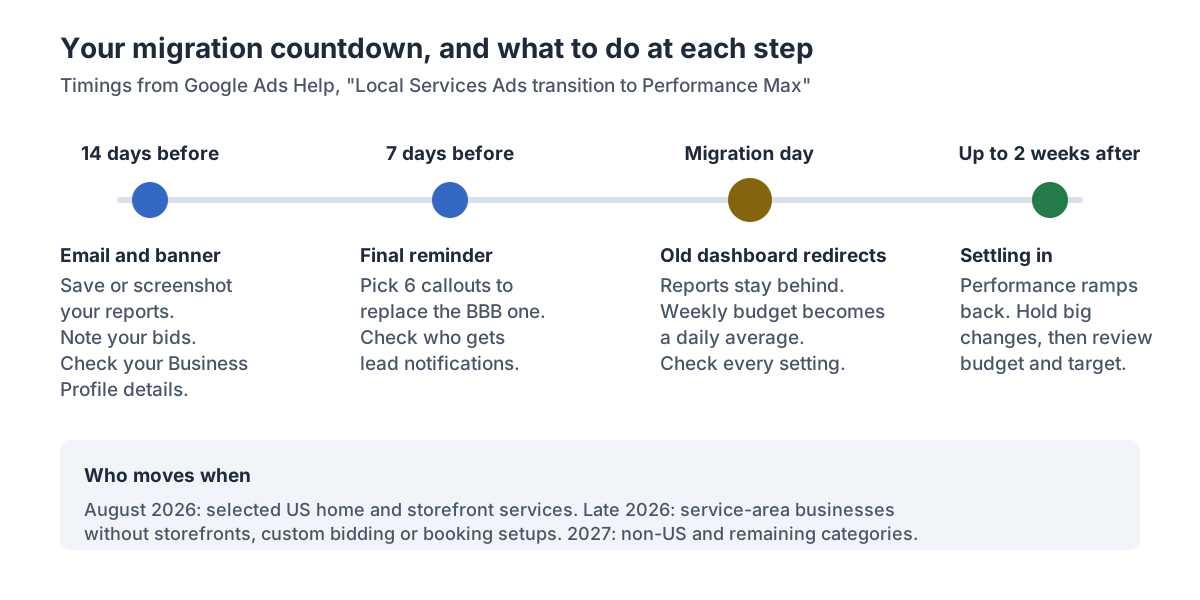
You’ll get an email 14 days before your date, a banner in your dashboard, a final reminder 7 days later, and a confirmation once it’s done.
Isn’t Google Ads too complicated for me to run?
You need far less of it than the dashboard suggests. One advertiser on r/LocalServicesAds described the worry: “every time I open the regular Google Ads dashboard, the sheer number of campaigns, settings, metrics, and recommendations makes my head spin.”
The pay-per-lead campaign stays simple. Google’s page says headlines, videos and sitelinks “don’t apply to campaigns with pay-per-lead goals,” and you can’t create new pay-per-lead campaigns inside Google Ads yet. You need five places:
- Campaigns > Settings: budget, target, service areas, ad schedule, and pause or resume.
- Goals > Conversions > Leads: your old lead inbox, with charge status, the feedback form and downloads.
- Admin > Notifications: who gets lead emails.
- Assets: photos and callouts.
- Your Google Business Profile: name, address and hours, which sync one way into Google Ads.
In the campaign view, “Conversions” is the number of leads you were charged for, and “Cost / conv.” is your average cost per lead.
What should I do before my account migrates?
Work through it in order. The first two steps take minutes and protect what you can’t get back.
- Save your history. Screenshot or download your performance reports: leads by week, cost per lead, lead types, and anything you use to judge whether the ads pay. Lead history transfers; the reports don’t.
- Record your settings. Bidding mode, any per-category targets, budget, service areas, job types, ad schedule. You’ll want to check them against what arrives in Google Ads.
- Decide on one target or several. Google replaces per-category targets with a single campaign-level target, which it calculates and applies to all your categories. If you run, say, plumbing and HVAC at very different lead prices, Google says you can keep them apart with separate campaigns, which for now you set up in Local Services.
- Tidy your Business Profile, then leave it alone. A significant change to your business name or address triggers a verification review that Google says typically takes 24 to 48 hours, and your campaign may pause during it. Make changes well before your date, not during the move.
- Replace the BBB callout. Choose at least six structured callouts, such as hours, specialties or payment methods.
- Check notifications. After migration everyone is opted in to lead emails by default. Decide who should get them and turn the rest off.
- On the day, check, don’t tinker. Confirm areas, job types, schedule, budget and phone number came across. Google says to allow up to two weeks for the migration to complete and performance to ramp back.
- After two weeks, review. Compare cost per lead and lead volume with the reports you saved, then adjust budget or target.
When to go further: if you’ve never been sure your leads turn into booked jobs, this is a natural point to start tracking that, because you’re starting a new reporting history anyway. Tracking from lead to booking is part of Paid Advertising Management.
How does the budget change?
Your weekly average becomes a daily average, and the monthly ceiling stays about the same.
Worked example (example, not a statistic). Assume a weekly budget of $700.
| Step | Example figure |
|---|---|
| Weekly budget before | $700 |
| Daily average after (÷ 7) | $100 |
| Monthly cap after (× 30.4) | $3,040 |
Google’s Local Services Help page already caps your monthly spend at your weekly budget times the average number of weeks in a month, which for $700 is about $3,040 too. What changes is how it reads: you’ll see a daily figure. Google says daily spend may fluctuate on high-demand days, but monthly billing won’t exceed the cap.
Numbers we left out
- “$4,000 to $6,000 a month for an ad manager.” We found no source for it.
- “Migration is mandatory and there is no opt-out.” We’ve seen it claimed. Google’s page says existing campaigns “will be automatically migrated,” but doesn’t use the words “no opt-out.” If you need a firm answer for your account, ask the support line.
- “Google used to charge after 30 seconds.” We’ve seen it claimed, but couldn’t confirm it on any Google page. The current rule for missed calls is in our piece on the 1 October change.
Where this breaks down
- Dates are per account. The phases are Google’s plan, and your email is the only reliable date for you.
- Google is still building it. The page says a report download page “will be available soon” and that creating new pay-per-lead campaigns in Google Ads “will become available later.” Re-check it before you act.
- The lead rules didn’t change with the move, but they did change on 1 October. Missed calls during business hours can now be charged if the caller stays on the line for more than 20 seconds. That’s a separate change, and worth checking too.
- Your first weeks of data will be noisy. Google says to allow up to two weeks for performance to stabilise, so don’t judge the new setup on its first days.
How Leadio does it
Leadio’s Paid Advertising Management runs Local Services Ads alongside Google Search and Meta, in accounts in your business’s name. For the move, we export your reports first, then manage the new campaigns with the rest of your account: targets, budgets, service areas, lead review, and tracking from each lead to a booked next step. We say where tracking stops rather than guess.
Calls your ads create still need someone to answer them. If that’s a gap, our 24/7 Answering Service, an AI receptionist run for you, answers them around the clock. Try it at the voice demonstration. Read how Paid Advertising Management works, then bring your offer, your area and what a booked job is worth, and we’ll check whether paid ads make sense now.
FAQ
Are Local Services Ads going away? Not the ads. The separate Local Services dashboard is going away, and your campaigns move into Google Ads as Performance Max campaigns with pay-per-lead goals. They still show on Search and Maps and still charge per lead.
Do I keep my Google Verified badge? Yes, if you’ve completed verification. Google says the status and badge transfer automatically, and insurance and license reverification are no longer required.
Will my lead history transfer? Google says lead history transfers but past performance reports don’t. Save the reports before your date.
Will I start paying per click? No. Google says you still pay only for valid leads, such as calls, messages or bookings, not clicks.
How do I pause my ads after migrating? In Google Ads, go to Campaigns > Settings, select the campaign and set it to Paused. Set it back to Enabled to resume.
Paid Advertising Management
Google Search, Local Services Ads and Meta campaigns, built as one path from ad to booked appointment.
More from get found.
Are your Facebook leads junk, or just slow to reach?
Before you blame Meta for bots, check how fast your team called. Facebook lead forms are built for volume by default, and a lead reached the next day is a different lead. A three-question check, the form settings to change, and when to go further.
Can an AI clone of you post for your business, and should it?
An AI clone built from your voice and likeness can deliver videos you never filmed. Whether it helps or costs you trust comes down to consent, disclosure and what you use it for. What the research says, how the capture session works, and when not to use one.
Google now charges for some missed LSA calls: what changed on 1 October 2026
Since 1 October 2026, a Local Services Ads call you miss during business hours can be charged as a lead if the caller stays on the line for more than 20 seconds. Here is the rule, what it costs you, and the smallest fixes.
See where your leads are leaking.
Find out which stages are leaking, who we'd staff to plug them, and which Growth Team follows.